How to Write a System Prompt for an Agent, Not a Workflow
Published: 2026-04-29
How to Write a System Prompt for an Agent, Not a Workflow
There's a mistake I see repeatedly when developers first start building AI agents: they write a system prompt that reads like a procedure manual. Step 1: do this. Step 2: check that. Step 3: if X then Y. The prompt is thorough, detailed, and completely wrong for what an agent is supposed to be.
If your agent's system prompt describes a fixed sequence of steps, you haven't built an agent — you've built a workflow with a very expensive decision layer on top. Understanding the difference isn't just academic. It determines whether your system is adaptable or brittle, and whether you're paying for capabilities you're actively suppressing.
The Core Distinction
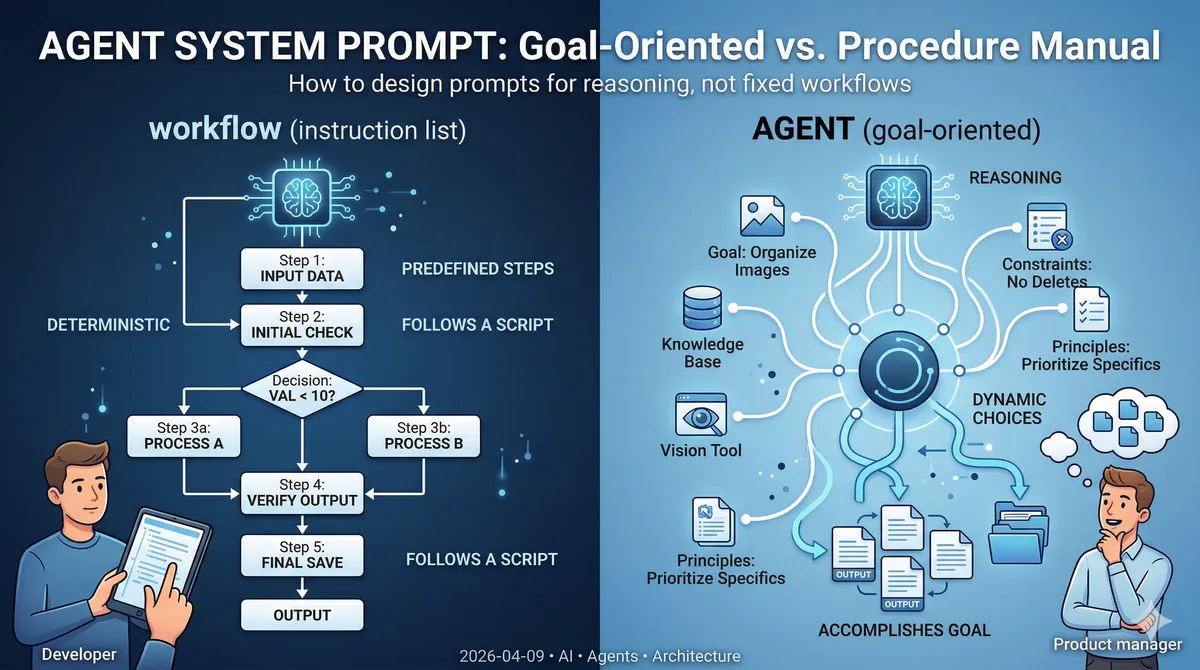
A workflow is a deterministic sequence of steps. The path from input to output is specified in advance. The same input always produces the same output via the same route. Workflows are excellent when your problem space is fully enumerable — when you can draw the decision tree on a whiteboard and cover every branch.
An agent is a system where the model decides, at runtime, what to do next based on what it observes. The path emerges from reasoning, not from a predefined script. Agents are appropriate when the problem space is too large or too dynamic to enumerate in advance.
The mistake isn't choosing one over the other — it's building an agent and then writing its instructions like a workflow.
What Happens When You Write Workflow Instructions for an Agent
Consider a practical example: an image classification agent. Its job is to look at images, consult a knowledge base of descriptions, and organize files into categories.
A workflow-style system prompt might look like this:
1. List all files in the /images directory
2. For each file, read the corresponding description from /knowledge
3. Compare the image against the description using the vision tool
4. If confidence > 0.8, move the file to /organized/{category}
5. Otherwise, move it to /unclassified
This looks reasonable. But consider what happens when:
- Some images have no corresponding description in /knowledge
- A new category appears in the knowledge base that wasn't there before
- An image matches partial criteria from two different descriptions
- The /knowledge directory structure changes
The workflow breaks. Or worse, it silently produces wrong results because the agent dutifully follows the script even when the script doesn't fit the situation.
More fundamentally: you've told the agent how to do the task. But the agent already knows how to reason about tasks. What it needs from you is what to accomplish and within what constraints.
The Three Elements of a Good Agent System Prompt
When the task involves dynamic data — descriptions that change, categories that evolve, edge cases you can't enumerate — a good agent system prompt has three components:
1. The goal
What outcome should the agent produce? Not what steps should it take — what should be true when it's done?
Your goal is to organize the images in /images into categories based on
the descriptions available in /knowledge. Images that cannot be confidently
classified should be placed in /unclassified.
2. Limits and constraints
What should the agent never do, regardless of what it observes? These are the guardrails.
- Do not delete source files — only create copies in the organized directory
- Do not invent category names; use only categories found in /knowledge
- If you're uncertain about a classification, choose /unclassified over a guess
- Do not make more than 3 attempts to classify a single image
3. Universal principles and patterns
What general knowledge will help the agent handle cases it hasn't encountered before? This is distinct from step-by-step instructions — it's heuristics, not procedures.
When an image partially matches multiple descriptions, prefer the most
specific match over the most general one. When no description matches
well, note the visual characteristics in the filename before moving
to /unclassified — this helps future classification runs.
Notice what's absent: no enumerated steps, no hardcoded file paths, no "if X then Y" branching. The agent gets a target, boundaries, and principles. The how is left to runtime reasoning.
Why This Matters for Dynamic Data
The image classification example is useful precisely because it involves dynamic data:
- The knowledge base descriptions can change — a product gets rebranded, a new item is added
- The image set grows over time with new edge cases
- Not every image will have a matching description
A workflow-style prompt handles the happy path and fails silently on everything else. An agent with a goal-oriented prompt can reason about novel situations: "There's no description matching this image, but based on the visual characteristics and the closest description, /unclassified seems right. I'll note what I observed."
The tradeoff is honesty you have to accept upfront: an agent with dynamic data will not achieve 100% accuracy. It will make judgment calls, and some of them will be wrong. This is a feature, not a failure — it's what makes the system handle real-world variability. The goal shifts from "deterministic correctness" to "reliable enough that human review of edge cases is faster than doing the whole task manually."
When to Use a Workflow Instead
Not everything should be an agent. If your task meets these criteria, use a workflow:
- The steps are fully enumerable and don't depend on runtime observations
- The data is static or changes in ways you can anticipate and handle with branching logic
- You need deterministic, auditable outputs
- You can write a meaningful test that specifies exact expected output
The honest question to ask is: If I drew the complete decision tree for this task, could I fit it on a whiteboard and cover every case? If yes, a workflow is appropriate — and it will be faster, cheaper, and more reliable than an agent.
Agents earn their complexity when the answer is no.
The Visual Difference
When you look at a workflow system prompt side by side with an agent system prompt, the difference is immediately visible even before reading the content:
The workflow prompt is longer, more structured, and reads like documentation. It has numbered lists, conditional branches, specific file paths, and references to particular data values.
The agent prompt is shorter, goal-oriented, and reads like a brief to a junior colleague. It explains what success looks like and what to avoid, then trusts the model to figure out the path.
This isn't a coincidence. A well-written agent prompt being shorter than a workflow prompt is a signal that you've correctly identified what the model should decide at runtime versus what you need to specify in advance.
Practical Takeaways
- If your system prompt has numbered steps, ask whether you're building an agent or a workflow. Often the right answer is to build a workflow — but if you need an agent, remove the steps.
- Give agents goals, not procedures. Describe what done looks like, not how to get there.
- Constraints are different from steps. Constraints tell the agent what it must never do. Steps tell it what to do next. Agents need the former, not the latter.
- Principles handle cases you didn't anticipate. When the agent encounters a situation you didn't foresee, a well-written principle can guide it. A missing step cannot.
- Accept that agents aren't deterministic. If you need determinism, you need a workflow. An agent's value is handling the cases a workflow can't enumerate — and that requires tolerating some variability in the outcome.
The shift in thinking is real: you're no longer specifying a process. You're setting up conditions under which a capable system can reason effectively. That's a different skill than writing procedural code — and once you internalize it, your agent prompts get shorter, more robust, and significantly harder to break.