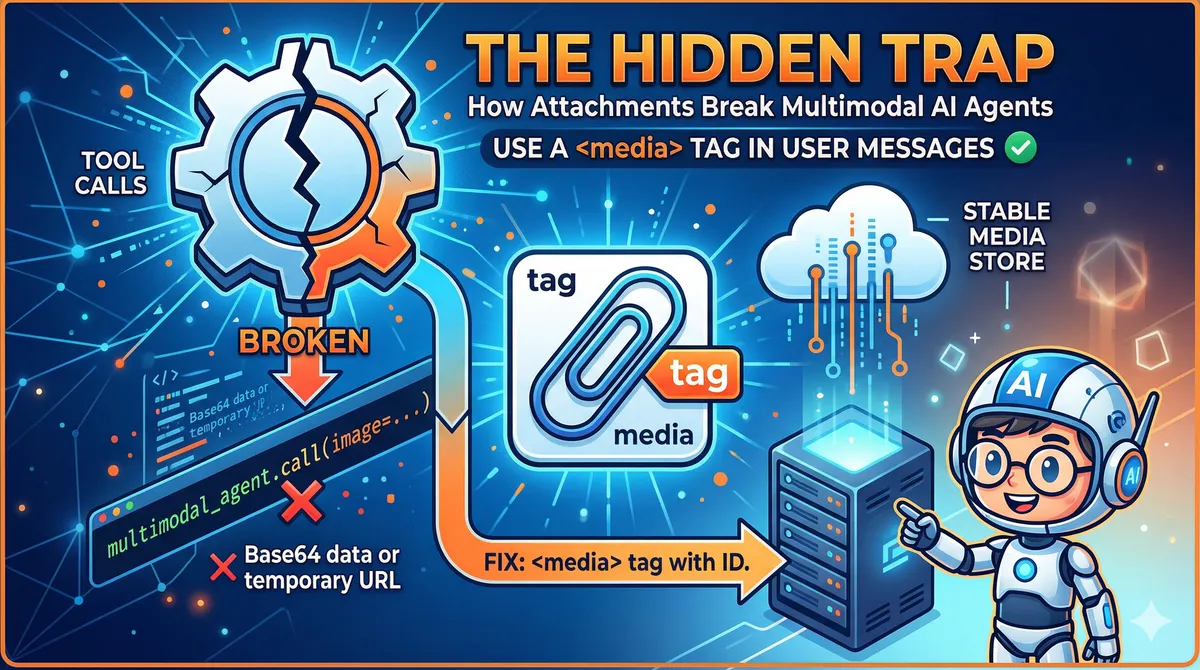
The Hidden Trap in Multimodal AI Agents: How Attachments Break Tool Calls
Published: 2026-04-21
The Hidden Trap in Multimodal AI Agents: How Attachments Break Tool Calls
You've built a beautiful AI agent. It can read emails, analyze images, call APIs, and write reports. You test it end-to-end and everything looks fine — until a user attaches an image to a message and the whole pipeline quietly falls apart.
This is one of the least-documented failure modes in multimodal agent design. The agent appears to work. The LLM sees the image. But when it tries to pass that image to the next tool, nothing gets through. The tool receives an empty reference, a broken URL, or — worst of all — silently ignores it.
Let me explain exactly why this happens and how to fix it.
What the LLM Actually Sees
When a user sends a message with an attached image, the hosting platform converts it to one of two representations before it hits the model:
- Base64-encoded data — the raw bytes of the image, embedded directly in the message payload
- A temporary URL — a short-lived reference to the image stored on the platform's infrastructure
The LLM receives this as part of its context window. It can see the image, reason about it, describe it, answer questions about it. From a conversational standpoint, multimodal is working.
The trap is what happens next.
The Tool Call Boundary
When the LLM decides to call a tool — say, analyze_image(url) or extract_text_from_image(data) — it needs to pass the image reference as an argument. This is where the architecture breaks down.
The LLM can output the Base64 string or URL as text in its tool call arguments. But consider what this means in practice:
For Base64 data: A typical image encodes to hundreds of kilobytes or several megabytes of Base64 text. Embedding this in a tool call argument is technically possible but catastrophically expensive — it burns through context tokens, slows inference, and most tool-calling implementations have argument size limits that will silently truncate or reject the payload.
For temporary URLs: The URL is valid right now, but it was generated by the platform for a specific session. By the time the agent processes the response, calls a tool, and that tool makes an HTTP request to fetch the image, the URL may have expired. Platform-generated attachment URLs are often valid for minutes, not hours.
In both cases, the LLM cannot hold a reference to the image and hand it off. It can only reproduce text it saw — which may be stale, truncated, or too large to use.
# What the agent tries to do — and why it fails
def handle_message(message, attachments):
    # LLM sees the image in context ✓
    response = llm.call(message, attachments)

    # LLM outputs tool call: analyze_image(url="https://platform.cdn/.../tmp_abc123.webp")
    # Problem: url may be expired, Base64 may be truncated
    tool_result = tools.call(response.tool_name, response.tool_args)
Why This Is So Hard to Catch
The failure is insidious because it doesn't always manifest as an error. Common symptoms:
- The tool is called but receives
nullor an empty string for the image argument - The tool fetches the URL and gets a 403 or 404 — which may be swallowed as a soft error
- The agent hallucinates a description of the image rather than admitting it can't process it
- Everything works in development (where URLs don't expire quickly) but fails in production
If you're not explicitly validating that tools received valid image data, you'll miss this entirely.
The Fix: A <media> Tag in the User Message
The root problem is that image data lives outside the tool-calling pathway. The fix is to bring it inside — by injecting a structured reference into the user message that persists through the entire agent loop.
Before the message reaches the LLM, the orchestration layer intercepts attachments and adds a <media> tag to the user message content:
def preprocess_message(user_message: str, attachments: list) -> str:
    media_tags = []
    for attachment in attachments:
        # Store the attachment server-side with a stable ID
        media_id = media_store.save(attachment)
        media_tags.append(
            f'<media id="{media_id}" type="{attachment.mime_type}" />'
        )

    if media_tags:
        media_block = "\n".join(media_tags)
        return f"{media_block}\n\n{user_message}"
    return user_message
The <media> tag contains a stable, server-controlled identifier — not a temporary URL, not Base64. The LLM learns (via system prompt) that when it wants to use an attachment in a tool call, it passes the id attribute, not the raw data.
# Tool receives a stable media ID — not a fragile URL
def analyze_image(media_id: str) -> dict:
    image_data = media_store.fetch(media_id)  # Always available
    return vision_model.analyze(image_data)
# System prompt teaches the model the contract
SYSTEM_PROMPT = """
When the user's message contains <media> tags, these represent attachments.
To use an attachment in a tool call, pass its `id` attribute as the argument.
Do not attempt to reproduce image URLs or Base64 data directly.

Example: <media id="img_a3f9c2" type="image/png" />
To analyze: call analyze_image(media_id="img_a3f9c2")
"""
What This Architecture Achieves
The <media> tag approach solves several problems at once:
Stability — Media IDs are controlled by your infrastructure, not the platform's ephemeral CDN. They live as long as your session does.
Token efficiency — The LLM never needs to reproduce Base64 or long URLs. It only passes a short ID string as a tool argument.
Auditability — Every tool call that touches media goes through your media_store, giving you a complete log of which tools accessed which attachments.
Composability — Multiple tools in a chain can all reference the same media_id. The image is fetched once, cached, and reused.
Broader Lessons for Multimodal Agent Design
This problem is a specific instance of a general rule: anything that lives in the LLM's context window is not automatically accessible to tools. The LLM can reason about what it sees, but tool calls are a structured output pathway with different constraints.
Watch for the same pattern with:
- Audio transcripts — the LLM sees the text, but a tool needing the audio file needs a stable reference
- Document pages — a PDF parsed into context can't be trivially re-passed to a tool as a file
- Conversation history — the LLM has access to prior turns, but tools don't unless you explicitly pass them
The fix is always the same: establish a stable, server-side store for external resources and pass opaque IDs through tool arguments. Keep the heavy data out of the tool-calling layer.
Key Takeaways
- The LLM seeing an image in context does not mean it can pass that image to a tool
- Temporary platform URLs expire; Base64 is too large for tool arguments
- Inject a
<media>tag with a stable server-controlled ID before the message reaches the LLM - Teach the model the contract: use the ID in tool calls, never reproduce raw data
- This pattern generalizes to any external resource (audio, documents, prior uploads)
If your multimodal agent pipeline processes user attachments and you haven't explicitly designed the attachment-to-tool handoff, there's a good chance it's silently failing for some percentage of requests. The fix is small. The impact on reliability is significant.